Publishing blogs on Webflow should be a straightforward part of your marketing strategy. Yet for many businesses, it involves far more than writing an article. Someone has to research keywords, prepare the content, optimise headings, upload images, configure SEO settings, and publish everything manually. When your business needs 15 or 20 articles a month, these small tasks become a considerable workload.
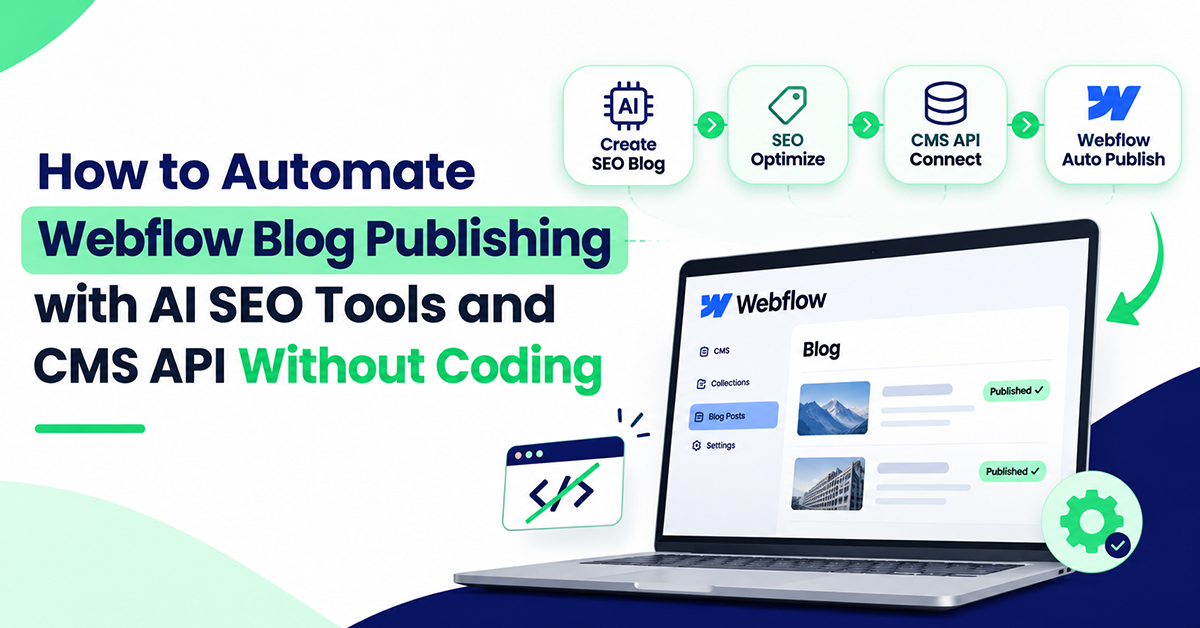
Webflow blog automation allows you to simplify this process using AI SEO tools, no-code integrations, and the Webflow CMS API. Instead of handling every publishing task separately, you can connect content research, writing, optimisation, and publishing into one organised workflow. HRL Infotechs AI helps businesses take this approach through its AI-powered content and SEO automation solutions, making regular publishing more manageable without requiring technical expertise.
What Is Webflow Blog Automation?
Webflow blog automation is the process of creating, optimising, and publishing blog articles through connected tools rather than manually managing each step inside Webflow.
The idea is simple. Your website needs relevant content to attract potential customers, but your team shouldn't have to spend hours transferring articles between different platforms.
For example, imagine a digital marketing agency managing five business websites. Every client needs fresh content, different keywords, and a consistent publishing schedule. Without automation, the agency spends valuable time coordinating writers, reviewing documents, and uploading articles.
With a properly configured Webflow blog automation workflow, much of that repetitive work can be reduced. HRL Infotechs AI's AI Blog Agent brings keyword research, SEO-focused writing, and automated publishing into a more organised process, helping businesses concentrate on their broader marketing objectives.
Why Should Businesses Automate Webflow Blog Publishing?
Businesses automate blog publishing because consistent content marketing becomes harder to manage as publishing requirements increase.
Consider an Indian business publishing 20 articles monthly. If preparing and uploading each article takes 30 minutes, the team spends approximately ten hours on publishing administration alone. This is an illustrative calculation, excluding research, writing, and editing.
That time could instead support customer research, conversion optimisation, or improving existing content.
HRL Infotechs AI approaches this problem by focusing on the full content workflow rather than treating AI as a simple article-writing tool.
The objective is to make content production more predictable while reducing avoidable manual tasks. This is particularly useful for marketing agencies, ecommerce stores, service providers, and growing businesses managing several content categories.
Of course, publishing more frequently doesn't automatically improve rankings. The articles still need to answer real questions, offer accurate information, and support your business goals.
How Can You Automate Webflow Blog Publishing Without Coding?
You can automate Webflow publishing by connecting an AI content platform with Webflow CMS through a supported integration or no-code automation service.
The process generally involves preparing your CMS, selecting the right AI SEO platform, connecting publishing permissions, and testing your first article.
Step 1: Prepare Your Webflow CMS Collection
Start by reviewing the Blog Posts Collection inside your Webflow project.
Check whether it contains the fields your publishing workflow needs, including title, URL slug, article body, excerpt, featured image, author, and SEO metadata.
Each field should have a clear purpose. If your article title is mapped incorrectly, the content may reach Webflow but appear in the wrong place.
Also confirm that custom SEO fields are connected to the appropriate settings in your Collection Page template.
Step 2: Choose the Right AI SEO Tools for Webflow
An AI writing tool and a complete SEO automation platform aren't necessarily the same thing.
Some tools only produce article drafts. Others support keyword research, content structuring, metadata preparation, and CMS publishing.
HRL Infotechs AI focuses on reducing the gap between researching a topic and preparing content for publication.
If you're comparing platforms, its guide to AI SEO tools for Webflow provides useful considerations for choosing an AI SEO tool, including content quality, search intent, and automation capabilities.
Before selecting any platform, check whether it supports Webflow publishing, editorial approvals, and the formatting your website requires.
Step 3: Connect Your Website Through the Webflow CMS API
The Webflow CMS API lets authorised software create, update, and publish collection items.
You don't need to write the API requests yourself if your integration platform or managed service handles the connection.
Webflow's Data API v2 supports staged and live content, making it possible to prepare articles for review before publication.
HRL Infotechs AI lists Webflow among its supported CMS platforms and provides onboarding assistance for website publishing connections. The exact integration method and available features should be confirmed for your selected plan.
Once connected, test one article before enabling regular publishing.
How Does HRL Infotechs AI Simplify SEO Content Creation?
HRL Infotechs AI helps businesses organise repetitive SEO and content tasks through AI-assisted research, content preparation, and publishing workflows.
Instead of beginning every article with a blank document, the process can start with identifying topics relevant to your industry and customers.
For instance, a real estate company in Indore might want articles about property documentation, home-buying expenses, or choosing commercial space.
An effective AI SEO blog writing tool should help identify which questions deserve individual articles and structure the content around those questions.
This matters because a blog that answers a customer's specific concern is usually more useful than a generic article written around repeated keywords.
HRL's approach to AI SEO content automation connects research, content creation, and ongoing optimisation with a broader business automation strategy.
For website owners, this creates an opportunity to establish a repeatable content process without managing every operational step personally.
Why Is Human Review Still Essential?
Even with advanced AI content tools, publishing without review introduces unnecessary risk.
AI may produce outdated figures, misunderstand local regulations, or describe a service that your company doesn't actually provide.
An accounting firm, for example, should verify tax-related information before publishing advice aimed at Indian business owners.
HRL Infotechs AI's content automation model can reduce production effort, but businesses should still review sensitive facts, service claims, and important commercial information.
This approach also supports Google's E-E-A-T principles: Experience, Expertise, Authoritativeness, and Trustworthiness.
Can an AI Blog Writer Automatically Publish to Webflow?
Yes. An AI blog writer with auto publishing can transfer articles to Webflow when it has a compatible CMS integration and the necessary permissions.
A dependable AI blog publishing tool for Webflow should do more than generate paragraphs. It should support a structured workflow that handles content preparation, CMS field mapping, and publishing controls.
HRL Infotechs AI's AI Blog Agent is designed around automated content production and website publishing, rather than requiring businesses to manage every article manually.
For a service business that publishes regularly, this can reduce the time between selecting a topic and preparing the completed article for the website.
There is one technical limitation worth understanding: Webflow's CMS API cannot directly control its native scheduled publishing state. An external scheduling system must handle timed API publishing separately.
That distinction matters when evaluating a provider's scheduling capabilities.
How Much Does AI Blog Automation Cost in India?
The cost of Webflow SEO automation depends on your required article volume, software subscription, integration needs, and editorial workload.
As a practical example, hiring a writer for 15 articles at ₹1,500 each would cost ₹22,500 monthly before adding separate SEO management and publishing expenses. These figures are illustrative.
HRL Infotechs AI advertises AI Blog Agent plans starting at ₹999 per month, with different content volumes and features. Check its current pricing and Webflow compatibility before purchasing.
The price difference can make automation attractive for smaller businesses, but software isn't a complete replacement for editorial judgement.
For a more detailed financial comparison, this article about AI content generators versus hiring content writers explains how businesses can evaluate their content production budgets.
The right decision depends on the quality you need, the volume you publish, and how much manual work you want to retain.
What Makes Automated Blog Publishing Software Worth Using?
Good automated blog publishing software should make your existing content process easier, not introduce a collection of new tasks.
Look for reliable CMS connectivity, useful keyword research, consistent formatting, approval options, and clear publishing status information.
For agencies, managing several client websites creates additional challenges. Each business needs different keywords, a distinct brand voice, and separate content schedules.
That's why publishing automation needs to be judged on reliability rather than content volume alone.
Businesses evaluating automated blog publishing software should also consider how well the platform supports collaboration, content checks, and multiple publishing workflows.
HRL Infotechs AI positions its AI Blog Agent around consistent content creation and publishing, while its wider automation services can help businesses identify repetitive processes beyond blogging.
Can Webflow SEO Automation Improve Google and AI Search Visibility?
Webflow SEO automation can support search visibility by helping businesses produce relevant, well-structured content consistently. However, the publishing process alone cannot guarantee rankings.
Traditional SEO still requires useful content, appropriate keywords, strong internal linking, and a technically accessible website.
Answer Engine Optimisation (AEO) helps organise content around clear questions and direct answers.
Generative Engine Optimisation (GEO) focuses on making information easier for AI-powered search systems to understand and reference.
For example, an article explaining Webflow CMS automation should answer what the API does, how publishing works, and where a no-code tool fits into the process.
HRL Infotechs AI's focus on keyword research and structured SEO content fits naturally into this approach. Businesses should combine automation with genuine expertise, factual verification, and regular performance reviews.
How to Start Webflow Blog Automation With HRL Infotechs AI
You don't need to rebuild your entire marketing process immediately. Start with a small content workflow, confirm that it works, and expand gradually.
Audit your website: Review existing Webflow articles, CMS fields, and publishing requirements.
Define your audience: Identify the questions your potential customers are searching for.
Explore HRL's AI Blog Agent: Compare content plans, publishing features, and available CMS integrations.
Connect your website: Configure the required access and verify how Webflow publishing is handled.
Review your first article: Check factual accuracy, SEO metadata, formatting, and internal links.
Test publishing: Confirm that the article appears correctly on the live website.
Monitor results: Track impressions, clicks, rankings, and relevant business enquiries.
Once the workflow is reliable, you can expand the publishing calendar without increasing manual administration at the same pace.
Make Your Webflow Content Workflow Easier With HRL Infotechs AI
Your business needs content that helps customers understand your services, answers their questions, and gives them a reason to contact you. Managing the publishing process shouldn't take attention away from those goals.
HRL Infotechs AI brings together AI-powered keyword research, SEO content creation, and automated publishing solutions to help businesses simplify their content operations.
Whether you're managing a growing company website or producing articles for multiple clients, the AI Blog Agent offers a practical starting point for reducing repetitive blogging work.
Explore HRL Infotechs AI's solutions and request a demonstration to find out how its automation workflow could fit your Webflow website, content targets, and marketing budget.